It uses a browser, the way you would.
That is the whole trick. Clerk.AI is a Mac app that points an AI at a real Chrome window and has it do the routine, repetitive half of your month: log in, download, search, match, name, attach. Everything you already do, except you are not the one doing it.
Three moves, and the month is ready to send.
Your bank, your card, your suppliers’ billing portals, your mail. A real browser on your Mac, on a profile kept just for this. When it meets a login only you can pass, it leaves the tab open and asks.
Statements, invoices, the photos of receipts on your phone. It works out which document belongs to which transaction, names them the way your accountant likes, and checks its own count against the statement.
Was that lunch a client’s? Which company was this for? A handful of questions a month, answered by speaking a sentence — and most of them are just “let me in”.
Which is why it works with everything: there is no integration anywhere in it. If you can reach a receipt in a browser, so can Clerk.AI — no connector to wait for, no vendor that has to support us first, and nothing for your accountant to change.
See a month go past.
Below is one period, screen by screen. It is quicker to look than to read.
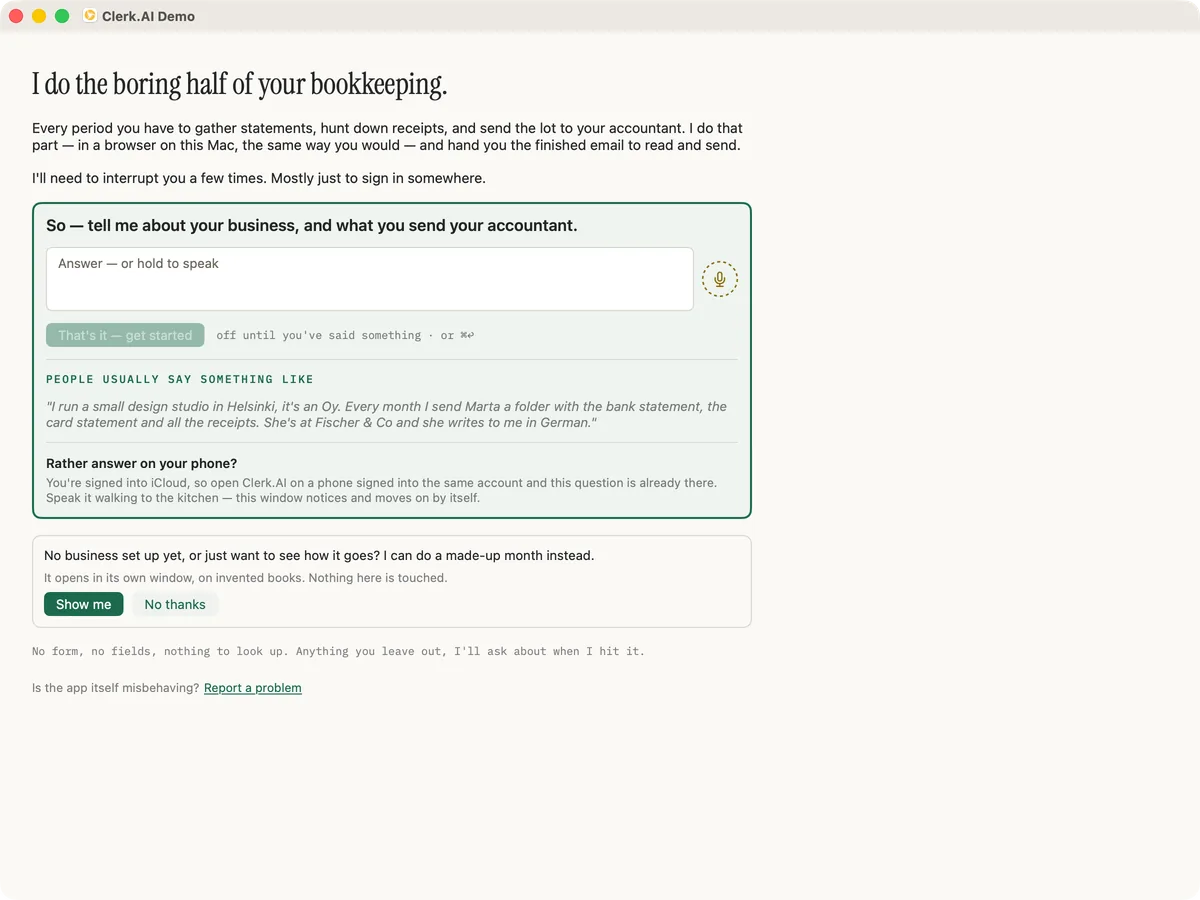
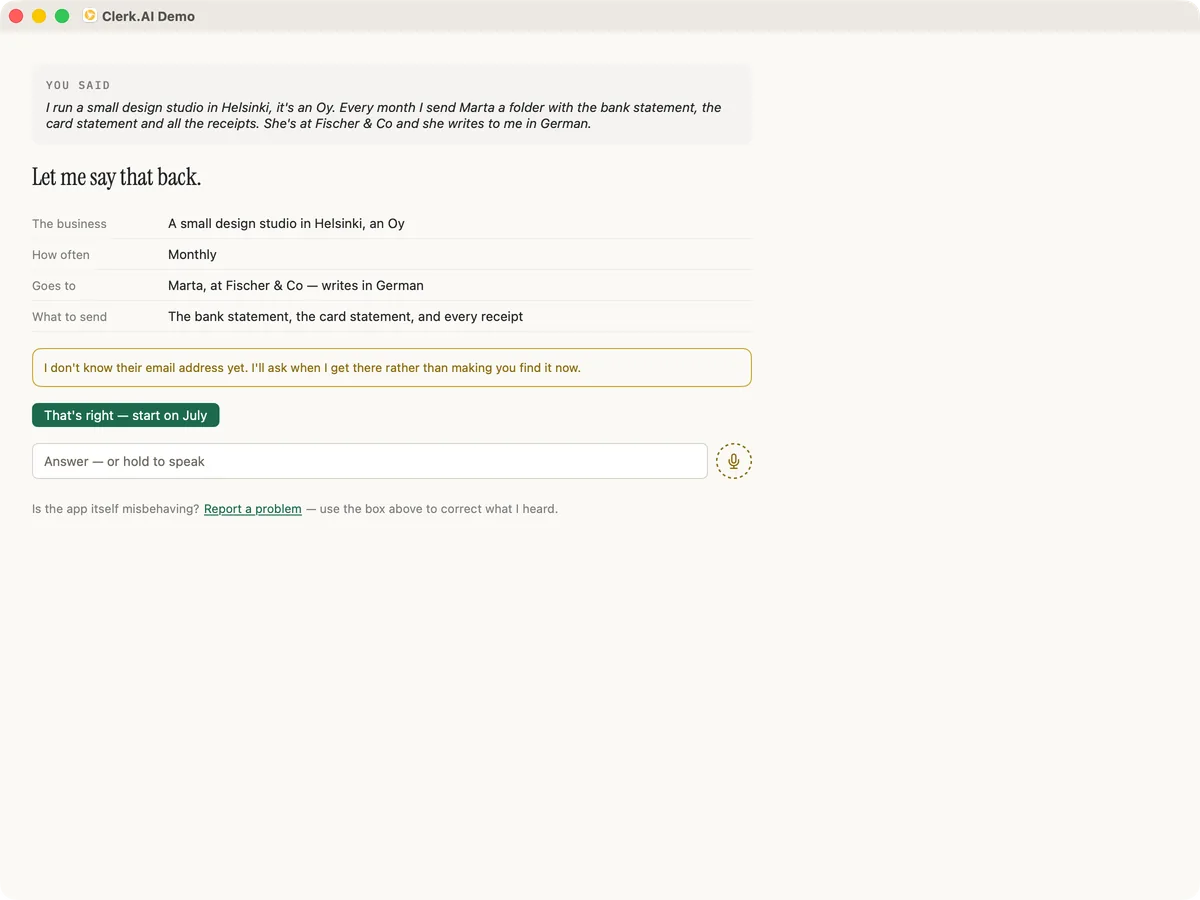
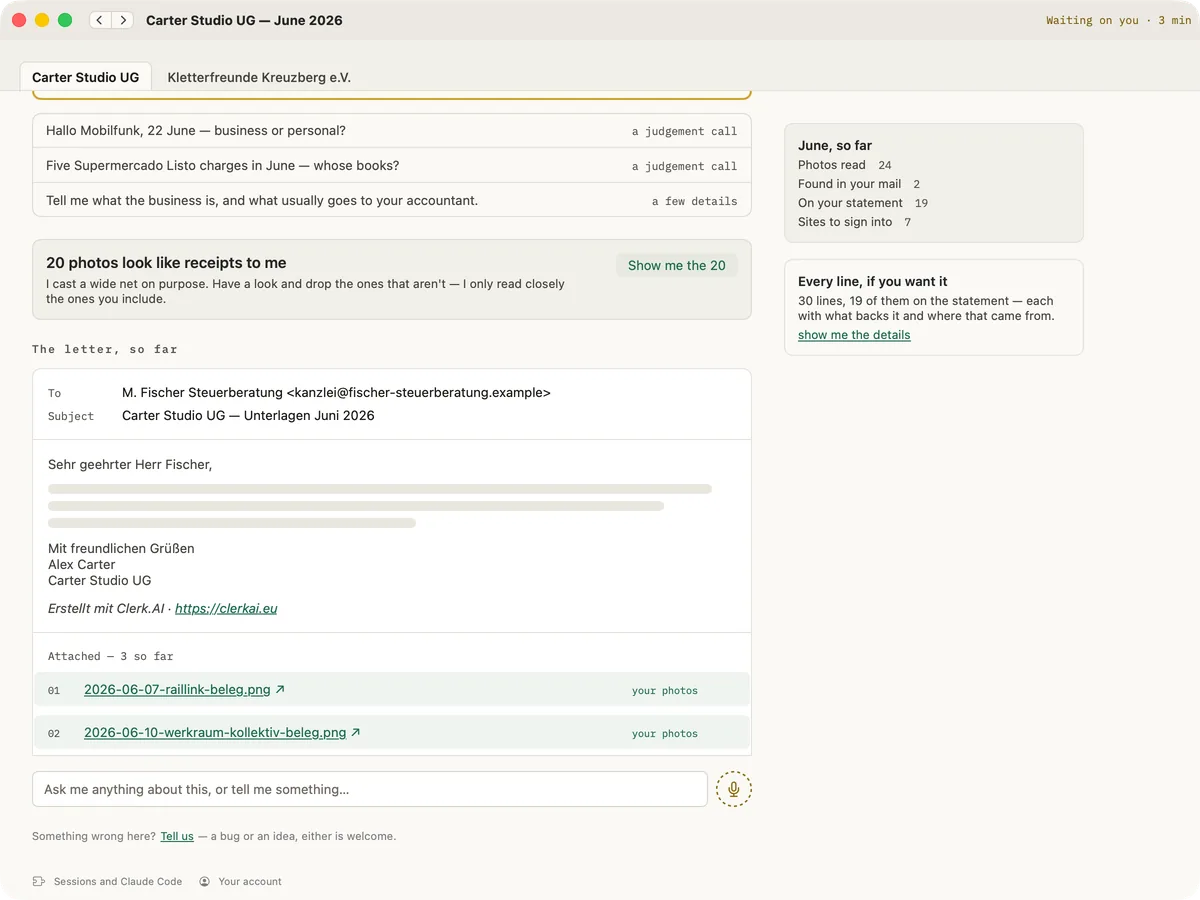
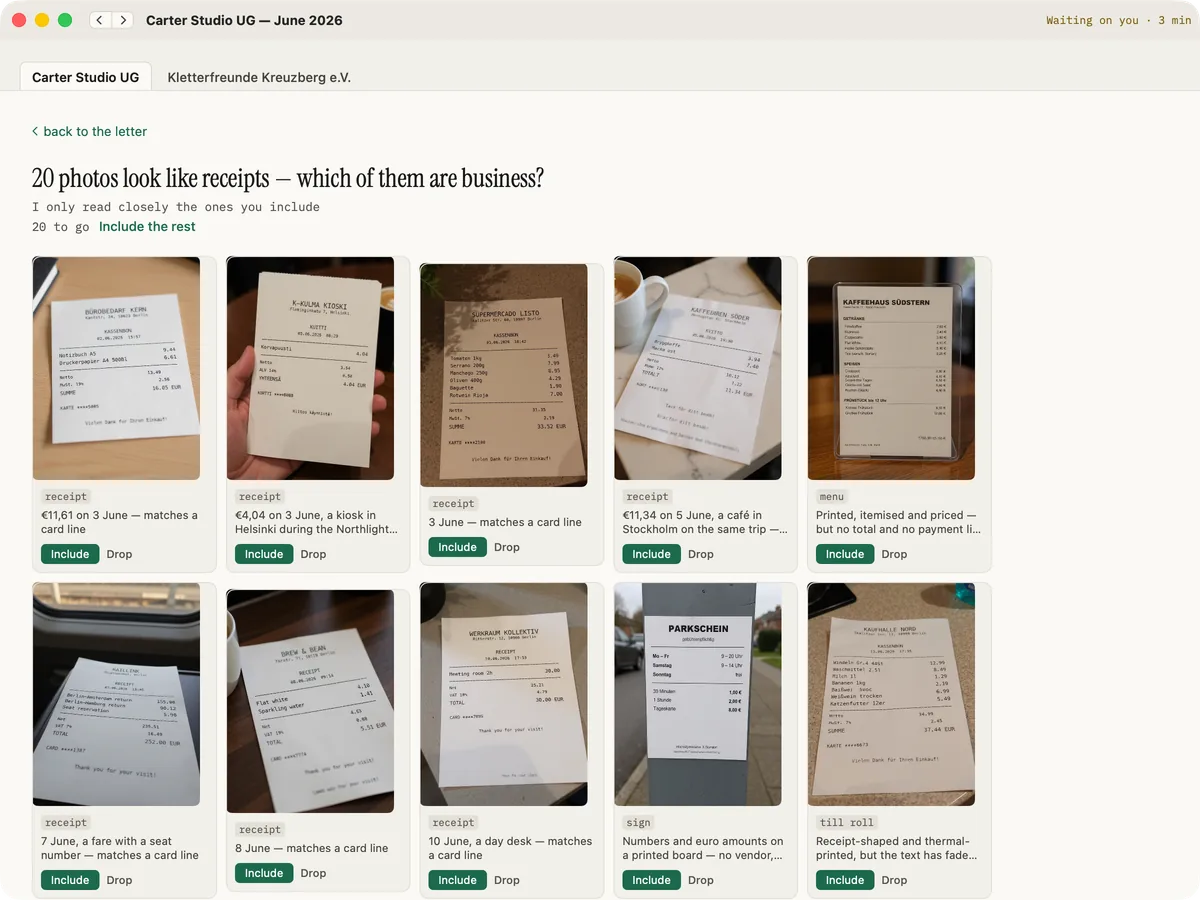
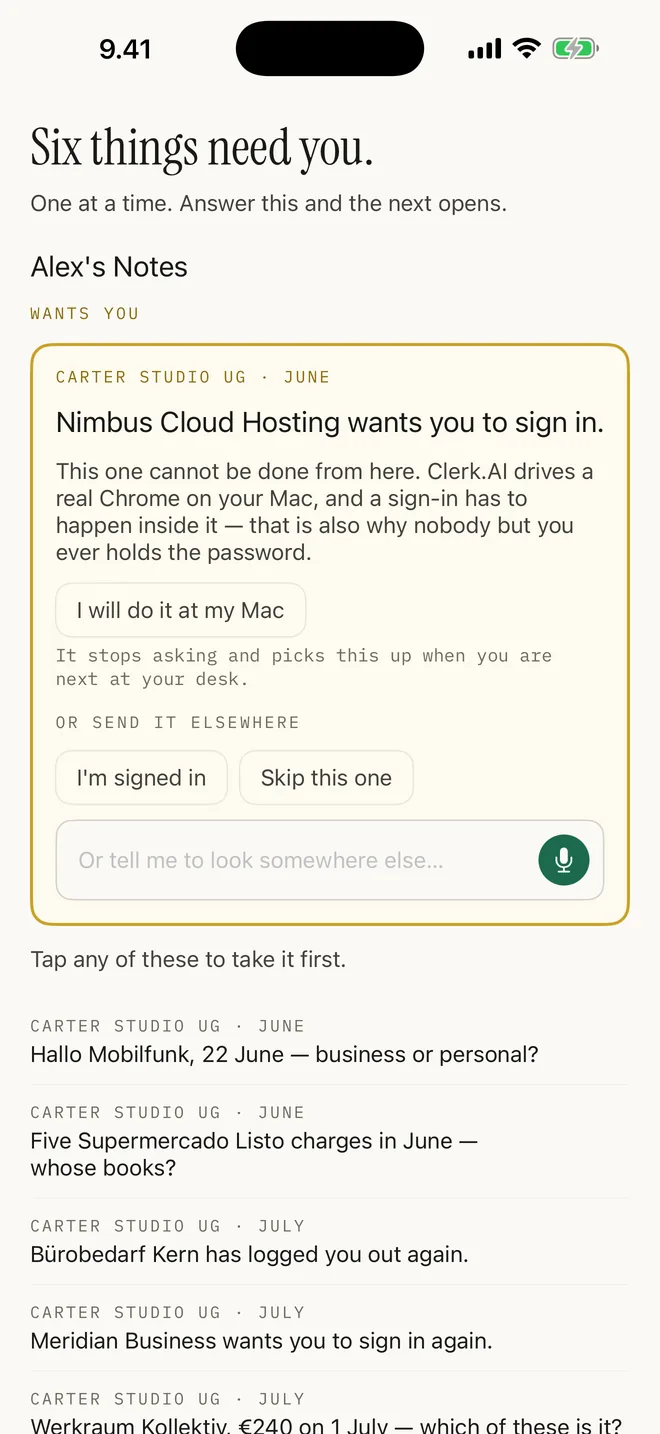
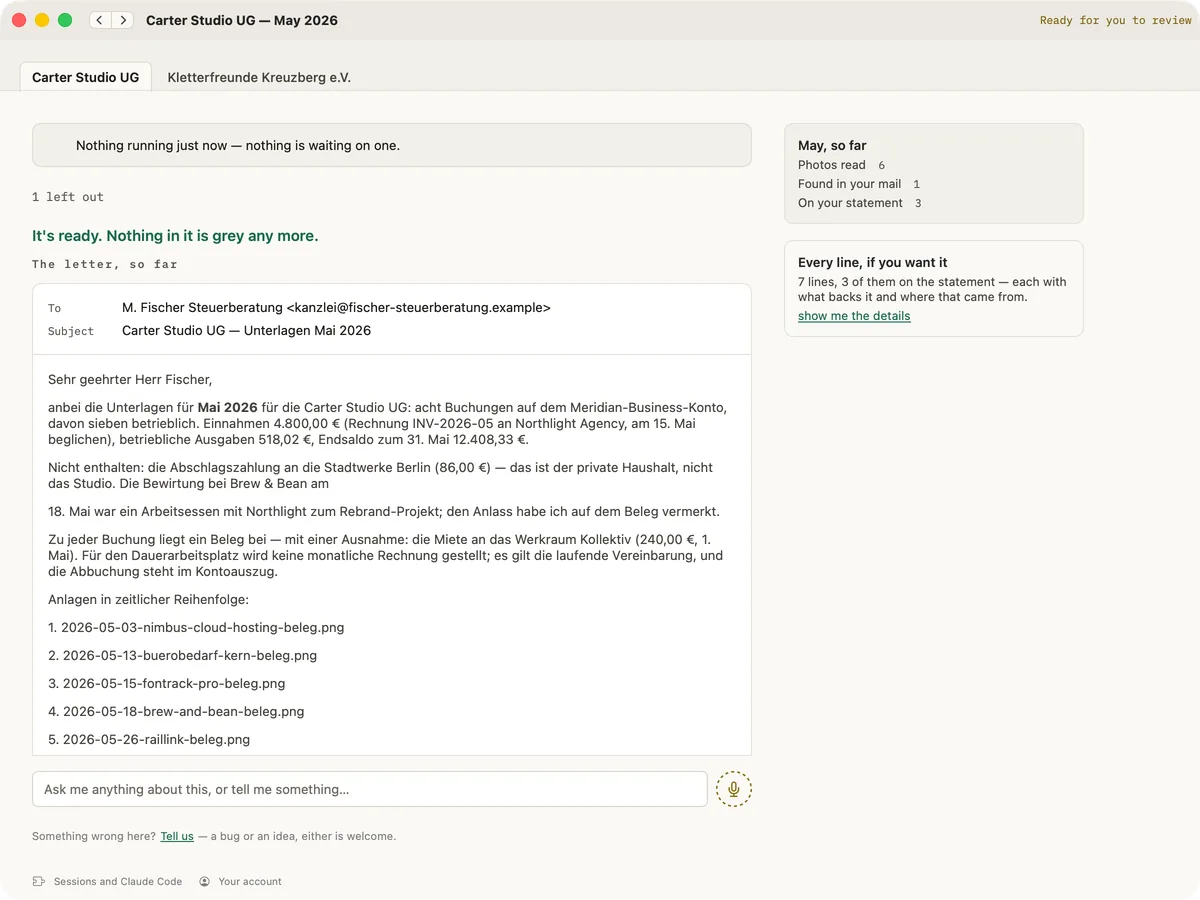
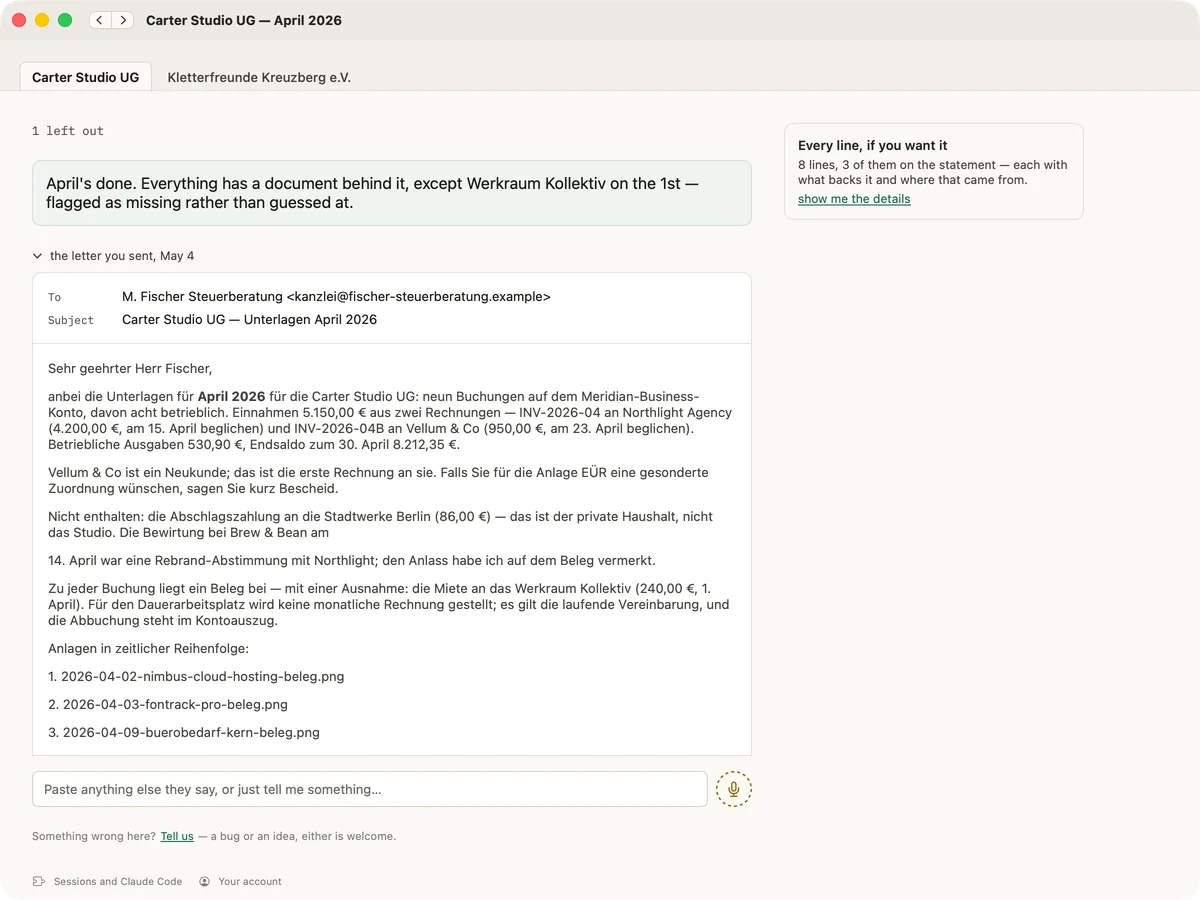
Your part is small, and it is the part that should be.
A close runs in the background over days, not in one sitting. It stops when it reaches something only a person can settle, waits however long you take, and picks up where it left off.
Most of what it asks is not judgment at all — it is a login it cannot pass on your behalf, because strong authentication is yours to approve. That is a feature, not a shortcoming.
It gets as far as the strong-authentication step and stops with the tab on the right page. Ten seconds, not ten minutes working out where it got to.
Personal or business, which company, what that lunch was. It asks rather than guessing, because a guess means you check every line — which is the whole job again.
Clerk.AI cannot mark your books closed. It stops at “ready for you to read”.
Every correction is kept and applied next period. The first close teaches it your banks and vendors; the second is the one worth having.
The things people ask at this point.
No. No account, no portal, no new software, no change of format. They get an email from you with a named folder attached, in the language they work in. There is a page you can forward them.
Some sites cannot be automated, and that is expected rather than broken. It tells you which, you drop the file into your books folder, and it carries on from there.
No — that is the point. Your Mac does need to be awake and online for it to make progress; it cannot work with the lid shut. Questions come to you as cards, and to your phone if you want them there.
It is built not to, fairly aggressively: it counts its rows against your statements, re-opens each file to check it really is the invoice it claims, and names anything unresolved instead of quietly dropping it. It is still a draft for you and your accountant to check.
Usually because you were handed a general tool and left to build the workflow yourself. This is one job with the workflow already built — including the awkward parts, which are the two sections below.
Yes, and if you already live in a terminal, go ahead — that is exactly how these books were done for nine months. Clerk.AI is that workflow with the sharp edges taken off: the browser automation set up for you, somewhere to steer it mid-run, questions that find you on your phone, and a packet you can read before it goes. It exists so people who are not versed in Claude Code can still get the benefit.
Whatever you decide, including nothing — there is a slider. The AI is your own arrangement and is the real cost: a Claude subscription.
What it needs from your Mac.
Claude Code. The app installs and configures it with you on first launch. It takes a few minutes, it involves a terminal, and it is the single step where people get stuck — so we'd rather say it here than let you find out the night before a deadline.
Google Chrome. Clerk.AI opens its own Chrome window on a separate profile kept just for this — not your everyday browsing. You sign into your banks and portals in there once, and those sessions stay put.
A Mac that stays awake. The work happens on your machine, in a browser window on it. It progresses whenever the lid is open — not while it's shut.
The model is plumbing, not the product. When something local or open is good enough to do this work, Clerk.AI will use it and this section gets shorter.
The agent step that reasons about your books does go to a model. Which one, and under whose agreement, is your choice: your own Anthropic subscription today, or at-cost credits through us once that is built.
Is it safe to let this near your bank?
The honest answer is: it is as safe as you decide to make it, and the decision is genuinely yours. The reason Clerk.AI works with everything is that it drives a real browser using sessions you signed into — in a Chrome profile of its own, apart from your everyday one. That is real power, and power of that kind deserves plain language rather than reassurance.
While a session is open, the agent can read what you can read and click what you can click. It is instructed to fetch statements and invoices and nothing else — but the capability is there, so treat it like handing your unlocked laptop to a very fast, very literal assistant.
Which is why you get to draw the line yourself. Give it everything, or keep your bank to yourself and hand it only the portals and the drudgery. It works either way, and the second option still removes most of the work.
An agent that reads your inbox and browses supplier sites is reading text written by other people. Text can contain instructions aimed at the agent rather than at you — hidden in an email, a PDF, or a page. Clerk.AI is scoped to reduce this, but no one in this industry has solved it, and anyone claiming otherwise is selling you something.
This is the one that matters most. Because Clerk.AI legitimately asks you to approve bank logins, you will get used to tapping approve. Read every prompt. If it names an amount, a payee, or an action you did not ask for, reject it and stop the run. A strong-authentication prompt is a decision, not a formality.
It reconciles, it flags its gaps, it refuses to close your books — and it can still mis-read a receipt or match the wrong document. Everything it produces is for you and your accountant to check. Nothing here is accounting or tax advice.
Clerk.AI runs on your computer, under your account, in a browser you signed into, at your instruction. You remain responsible for your own accounts, your own approvals and your own filings — including anything the agent does with a session you authorised, and anything you approve when prompted.
The software is provided as-is, without warranty, and Augmented Mind AB accepts no liability for financial loss, incorrect bookkeeping, missed deadlines or unauthorised transactions arising from its use. It is not accounting, tax or legal advice. If that trade isn't one you want to make, this isn't the right tool for you — and we'd rather say so here than after you've bought it.
Get your next month prepped.
It signs in where it can, collects the statements, finds the receipts that go with each line, and hands your accountant a folder and a drafted email you read before it goes.